Now Reading: What Is Technical SEO? Easy Guide to Technical Optimization
- 01
What Is Technical SEO? Easy Guide to Technical Optimization

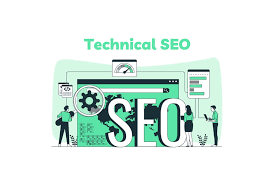
Technical SEO is one of the most important parts of search engine optimization. While content and backlinks help websites rank, technical SEO ensures that search engines can properly access, understand, and index your website.
If you’ve ever wondered what is technical SEO, think of it as the foundation of your website’s SEO strategy. Without a strong technical foundation, even the best content may struggle to achieve high rankings.
In this guide, you’ll learn the basics of technical SEO, why it matters, common technical issues, and a practical technical SEO checklist to improve your website’s performance.
What Is Technical SEO?
Technical SEO refers to the process of optimizing a website’s technical elements so that search engines can crawl, index, and rank its pages effectively.
Unlike on-page SEO, which focuses on content and keywords, technical SEO focuses on the backend structure of your website. It ensures that search engine bots can navigate your site without obstacles.
Key areas of technical SEO include:
- Crawlability
- Indexing
- Website speed optimization
- Mobile usability
- Site security
- Structured data
- XML sitemaps
- Website architecture
When these elements are properly optimized, search engines can understand your website better and provide a better user experience for visitors.
What Is Technical SEO and Why Is It Important?
Technical SEO directly impacts your website’s visibility in search results.
Even if your content is valuable, search engines may not rank it if they cannot crawl or index it properly.
Benefits of technical SEO include:
- Improved search engine rankings
- Faster page loading speeds
- Better user experience
- Higher organic traffic
- Increased website performance
- Reduced indexing errors
- Enhanced mobile usability
A technically optimized website creates a strong foundation for all other SEO efforts.
How Search Engines Crawl and Index Websites
Before understanding technical SEO deeply, it’s important to know how search engines work.
Crawling
Search engines use automated bots known as crawlers or spiders to discover pages across the internet.
These bots follow links from one page to another and collect information about websites.
This process is called crawlability.
If your website has broken links, poor navigation, or blocked pages, search engines may struggle to crawl your content.
Indexing
After crawling a page, search engines analyze and store it in their database.
This process is called indexing.
When users perform searches, search engines retrieve relevant pages from their index.
If a page isn’t indexed, it cannot appear in search results regardless of its quality.
Many websites face indexing issues due to technical errors, duplicate content, or incorrect settings.
What Is Technical SEO for Website Speed Optimization
Why Speed Matters
Website speed is a confirmed ranking factor and plays a major role in user experience .Google’s PageSpeed Insights tool can help identify performance bottlenecks and provide recommendations for improving page speed.
Visitors expect pages to load quickly. If your website is slow, users may leave before viewing your content.
This increases bounce rates and can negatively affect rankings.
Tips for Website Speed Optimization
To improve loading speed:
- Compress images before uploading
- Enable browser caching
- Use a Content Delivery Network (CDN)
- Minify CSS, JavaScript, and HTML files
- Reduce unnecessary plugins
- Upgrade to reliable web hosting
Proper website speed optimization improves both user satisfaction and search engine rankings.
Understanding Crawlability
Crawlability determines whether search engine bots can access and navigate your website.
Common Crawlability Problems
Some issues that affect crawlability include:
- Broken internal links
- Incorrect robots.txt rules
- Orphan pages
- Poor site structure
- Redirect chains
How to Improve Crawlability
You can improve crawlability by:
- Creating clear website navigation
- Using internal linking effectively
- Fixing broken links
- Maintaining a logical site hierarchy
- Updating your XML sitemap regularly
Better crawlability helps search engines discover and understand all important pages.
Common Indexing Issues and Solutions
Many websites lose valuable traffic because of indexing problems. You can monitor indexing status, crawl errors, and sitemap submissions using Google Search Console.
Common Indexing Issues
1. Noindex Tags
Pages marked with “noindex” cannot appear in search results.
2. Duplicate Content
Search engines may struggle to determine which version of a page should rank.
3. Blocked Pages
Incorrect robots.txt settings can prevent search engines from accessing important pages.
4. Server Errors
Frequent server issues can stop crawlers from indexing content.
How to Fix Indexing Issues
- Use Google Search Console regularly
- Remove accidental noindex tags
- Set canonical URLs
- Fix server errors promptly
- Submit updated XML sitemaps
Addressing indexing issues ensures your pages remain visible in search results.
The Role of XML Sitemaps
An XML sitemap acts as a roadmap for search engines.
It lists important pages on your website and helps search engines discover content more efficiently.
Benefits include:
- Faster content discovery
- Improved indexing
- Better crawling efficiency
Every website should maintain an updated XML sitemap and submit it through search engine webmaster tools.
Why Mobile Optimization Matters
Most internet users now browse websites on mobile devices.
Search engines use mobile-first indexing, meaning they primarily evaluate the mobile version of a website.
Mobile SEO Best Practices
- Use responsive design
- Ensure readable text sizes
- Optimize images for mobile devices
- Improve page loading speed
- Avoid intrusive popups
Mobile optimization supports both rankings and user satisfaction.
HTTPS and Website Security
Security is another critical component of technical SEO.
Websites using HTTPS provide encrypted connections between users and servers.
Benefits include:
- Improved trust and credibility
- Better user security
- Positive ranking signals
- Protection of sensitive data
If your website still uses HTTP, upgrading to HTTPS should be a priority.
Structured Data and Schema Markup
Structured data helps search engines understand content more effectively.
Schema markup provides additional information about pages, products, reviews, events, and other content types.
Benefits include:
- Enhanced search listings
- Rich snippets
- Better click-through rates
- Improved content understanding
Although structured data doesn’t directly increase rankings, it can improve visibility in search results.
Website Architecture and Technical SEO
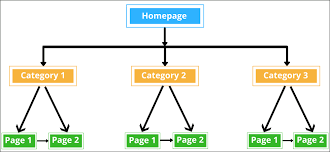
Website architecture refers to how pages are organized and connected.
A well-structured website helps both users and search engines navigate efficiently.
Best Practices for Site Architecture
- Keep navigation simple
- Use logical URL structures
- Create category-based organization
- Strengthen internal linking
- Avoid deep page nesting
Strong architecture supports better crawlability and indexing.
Technical SEO Checklist
Use this practical technical SEO checklist to evaluate your website:
Crawlability
- Check robots.txt file
- Fix broken links
- Improve internal linking
- Remove crawl barriers
Indexing
- Review indexed pages
- Fix indexing issues
- Submit XML sitemap
- Remove duplicate content
Website Speed Optimization
- Compress images
- Enable caching
- Reduce server response times
- Optimize code files
Mobile Optimization
- Use responsive design
- Test mobile usability
- Improve mobile speed
Security
- Install SSL certificate
- Use HTTPS across all pages
Structured Data
- Add schema markup
- Validate structured data
Website Performance
- Monitor Core Web Vitals
- Improve user experience
- Regularly audit technical issues
Following this checklist can significantly improve your website performance and SEO results.
How Often Should You Perform a Technical SEO Audit?
A technical SEO audit should not be a one-time task.
Experts recommend:
- Monthly checks for critical issues
- Quarterly comprehensive audits
- Immediate audits after major website updates
Regular monitoring helps identify problems before they affect rankings and traffic.
Conclusion
Understanding what is technical SEO is essential for anyone who wants to improve search visibility and website performance. Technical SEO focuses on optimizing the foundation of a website so search engines can crawl, index, and rank pages efficiently.
From website speed optimization and crawlability to fixing indexing issues and improving overall website performance, technical SEO plays a critical role in long-term search success.
By following a structured technical SEO checklist, maintaining a healthy website architecture, and regularly performing technical audits, you can create a search-engine-friendly website that delivers a better experience for users and achieves stronger organic rankings over time.